
Microsoft 365 Copilot, Copilot Studio or Foundry. Three questions settle it, and getting the answer wrong is expensive in both directions.
Microsoft now offers several places to build an agent, and the marketing for each one is written as though it can do everything. It can, technically. That is exactly why the decision is difficult.
Both failure modes are common. Teams build in Foundry what should have taken 20 minutes in Agent Builder, and then maintain it for 3 years. Or they build something departmental in Agent Builder, discover it needs an approval step and an ERP connector, and rebuild it twice.
Three questions
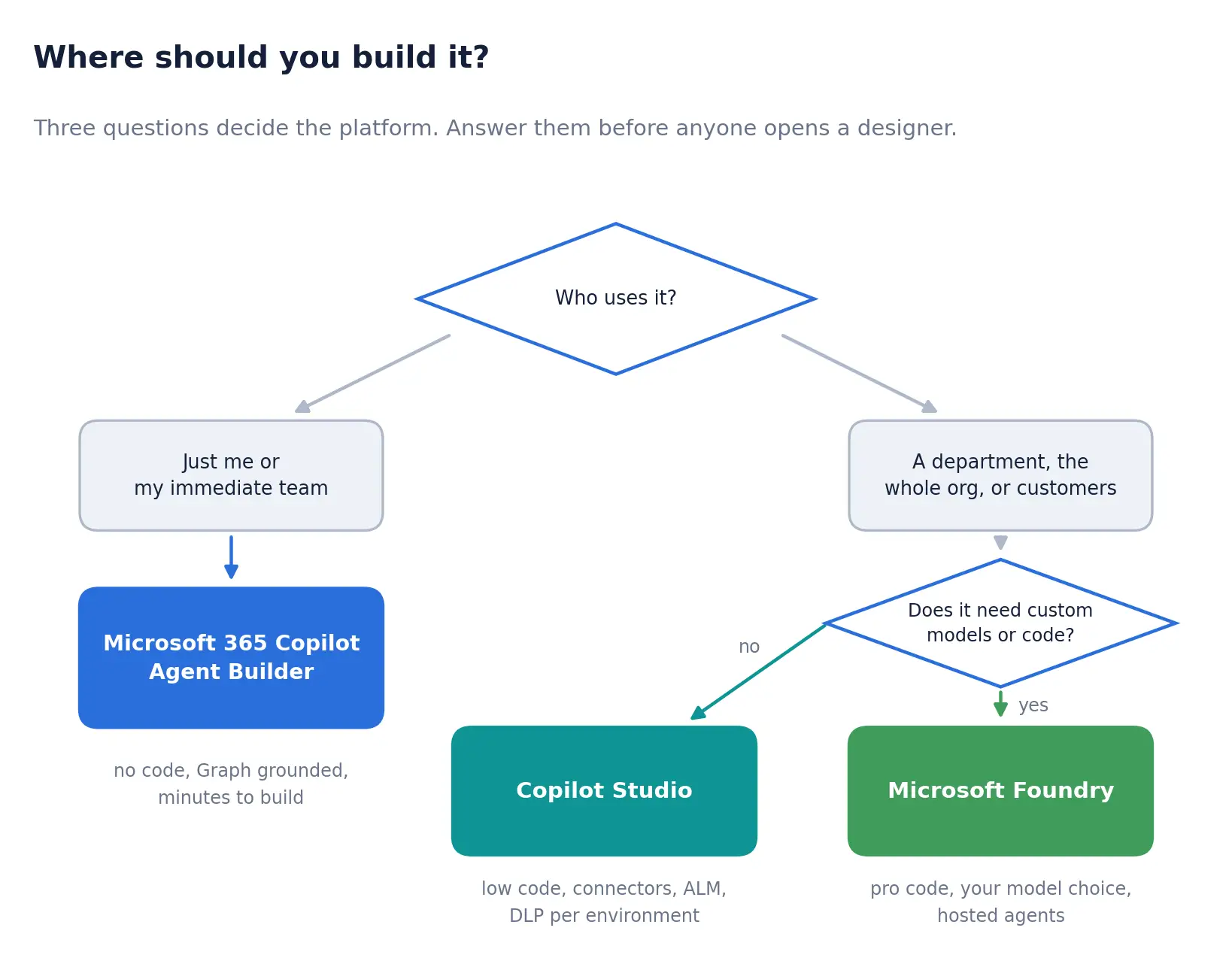
Who uses it. This is the question that does most of the work. An agent for you and four colleagues has fundamentally different requirements from an agent that a whole department depends on, and the difference is not capability. It is lifecycle. Departmental agents need versions, environments, a rollback path, and someone accountable when they break.
Does it need to reach beyond Microsoft 36?. If everything it needs is in SharePoint, Teams, Outlook and the Graph, the built-in grounding is genuinely hard to beat, because permissions come free and correct. The moment you need the ERP, the case management system or a partner API, you are in connector territory.
Does it need custom models or custom code? Most agents do not. Be honest about this one: engineering teams have a strong and understandable preference for the option with the most control, and control carries a recurring cost.
What you are actually trading
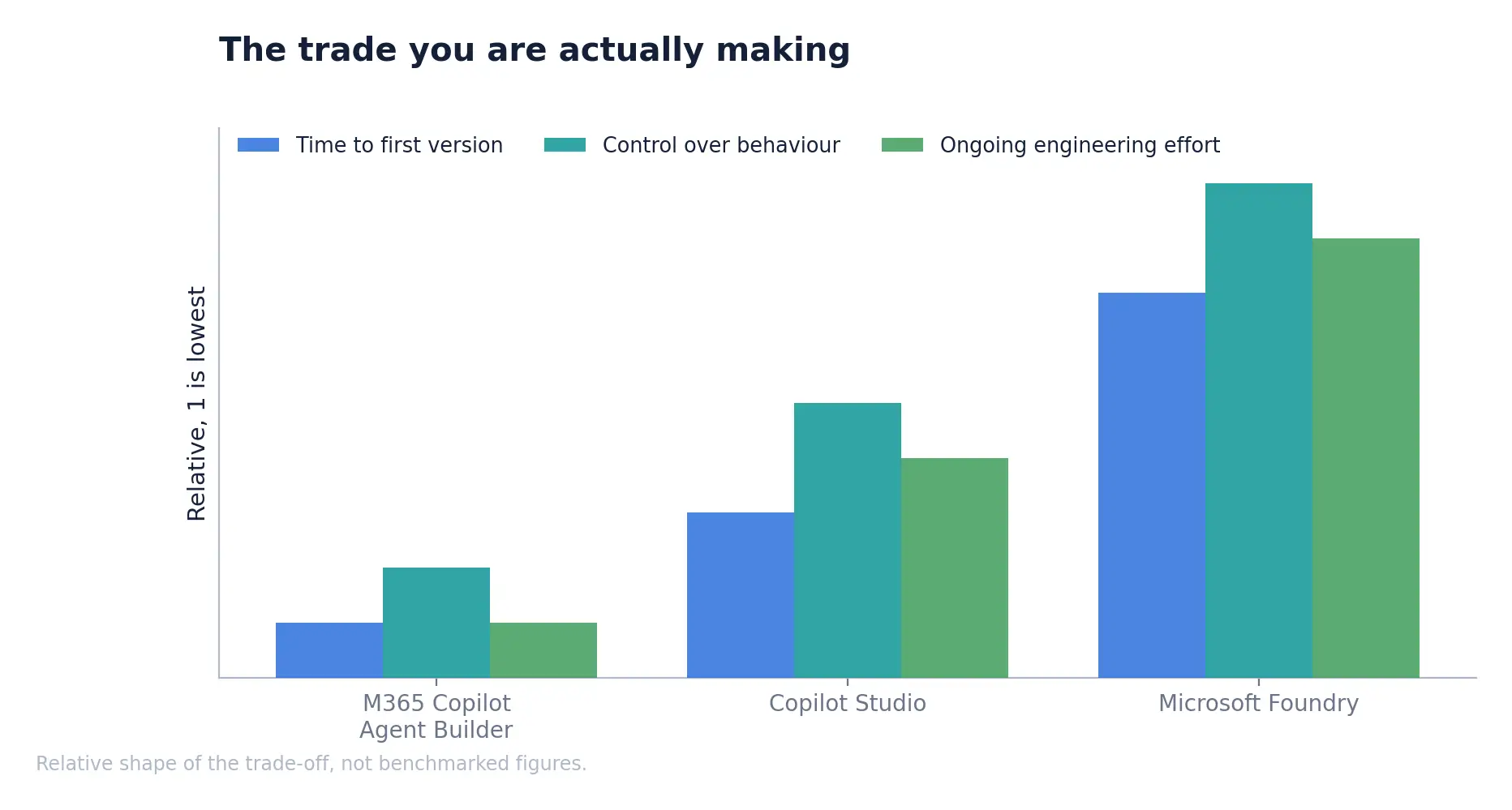
The honest framing is that you are choosing how much of the platform you want to own. Microsoft 365 Copilot owns nearly all of it and gives you very little room to change behaviour. Foundry gives you the room and hands you the responsibility for orchestration, evaluation, hosting and cost management.
Copilot Studio sits in the middle, and for the majority of business process agents it is the right answer. It has proper application lifecycle management across development, test, and production environments, connector governance so that administrators control what agents can access, and data loss prevention enforced at the environment level. Those are the capabilities that separate something you can run from something you can demo.
The comparison in full
| M365 Copilot Agent Builder | Copilot Studio | Microsoft Foundry | |
|---|---|---|---|
| Built by | Information workers | Makers and developers | Developers |
| Audience | Yourself or a small team | Department, organisation, customers | Any, including embedded in products |
| Typical build time | Minutes | Days to weeks | Weeks |
| Model choice | Fixed | Select a model or bring your own from Foundry | Full catalogue, plus model routing |
| Governance home | Microsoft 365 admin centre | Power Platform admin centre | Azure, with Purview and RBAC |
| Lifecycle management | Limited | Versioning, environments, pipelines | Full engineering lifecycle |
One detail worth knowing: these are notone-wayy doors. An agent built in Agent Builder can be copied into Copilot Studio, and Microsoft’s own guidance is to promote proofs of concept into managed Power Platform pipelines once they need source control and enterprise operations. Starting simple is not a trap.
For the practitioners
- Copilot Studio has a sixty-day free trial for Teams plans. Use it to test the shape of a use case before committing to licensing.
- Foundry offers prompt agents, which are declarative and need no agent compute, and hosted agents, which run your containerised code. The choice between them is often more relevant than the choice between Foundry and Copilot Studio.
- Do not default to the largest model. Microsoft’s guidance is explicit that premium models carry stricter rate limits that interrupt service at peak, and that model routing exists to optimise cost while holding quality. Match the model to task complexity.
- These options compose. A serverless agent runtime app can expose tools through MCP that both Foundry and Copilot Studio agents consume, so a shared capability does not need to be rebuilt for each platform.
- Agent cost varies with context size, reasoning depth and number of steps, so two superficially similar agents can consume very different budgets. Set spending limits per tenant, group or user before you scale.
The question behind the question
Platform debates are rarely really about platforms. They are usually a proxy for a disagreement about who owns the thing once it is live.
If IT builds it in Foundry, IT runs it, and the business waits in a queue for changes. If the business builds it in Copilot Studio, the business owns it, and IT worries about what connects to what. Both concerns are legitimate. Neither is resolved by choosing a tool.
The useful move is to settle the operating model first: who can build, in which environments, with which connectors, subject to what approval. Copilot Studio’s environment-level policies and publishing oversight are designed for exactly this negotiation, and administrators approving what reaches the organisational catalogue are a feature rather than an obstacle. Please get that agreed, and the platform question becomes much less interesting, which is the correct outcome.
Signals you chose wrong
The decision is reversible, but only if you notice. A few symptoms reliably indicate that an agent has outgrown or undershot its platform.
Built too light. People outside the original team keep asking for access. Changes are being made directly in production because there is nowhere else to make them. Someone has started keeping a spreadsheet of who has which version. There is no way to test a change before people feel it. Any two of these together means it should move to Copilot Studio.
Built too heavy. The agent has been live for a year, and nobody has touched the model configuration. The custom orchestration turned out to do the same as the built-in orchestrators. Most of the maintenance effort goes into infrastructure rather than behaviour. The engineering cost is real and recurring, and it is buying optionality that is never exercised.
The second case is more common than the first and much less likely to be raised, because nobody enjoys concluding that a year of engineering could have been a fortnight of configuration. It is still worth asking at the annual review.
A note on lock-in
This is a fair question, and I will provide a direct answer rather than reassurance. Committing to Copilot Studio or Foundry is a commitment to Microsoft’s orchestration, tooling and commercial model. That is real.
Two things moderate it. OneLake stores data in open Delta Parquet and Iceberg, so the underlying data is not trapped in a proprietary format, and data is usually the expensive part to move. And the widespread adoption of MCP as an integration standard means that the tools an agent calls can be exposed once and consumed by different runtimes, making the agent layer more portable than it was eighteen months ago.
What does not port is the prompt engineering, the evaluation set and the accumulated tuning. In practice, that is a few weeks of work per agent rather than a rebuild, which is a manageable risk. The larger lock-in in most organisations is the Microsoft 365 estate itself, and that decision was taken years before anyone was discussing agents.
What to take away
- Answer who uses it before anything else. Audience determines lifecycle needs, and lifecycle needs determine platform.
- Copilot Studio is the right default for departmental business process agents.
- Reserve Foundry for genuine model or code requirements, not for a preference for control.
- Match model size to task complexity and set spending limits before scaling, not after the first invoice.
- Settle who owns and approves agents before you settle where they are built.
